
Anúncios
Faded, torn, or water-damaged family photos don’t have to stay that way — a good old photo restoration app can bring them back to life in minutes. 📸
Grandparents’ wedding pictures, childhood snapshots, and sepia-toned portraits often sit forgotten in shoeboxes, slowly deteriorating. Modern AI-powered tools have changed what’s possible for these keepsakes.
What used to require hours of manual editing by a trained specialist can now happen through a few taps on a smartphone, with results that often surprise even skeptical users.
Why Old Photos Deteriorate So Quickly#
Paper-based prints are chemically unstable. Light exposure, humidity, and age cause silver halide particles to oxidize, creating yellowing, fading, and color shifts.


Physical damage compounds the problem. Folding, scratches, mold spots, and torn edges accumulate over decades, especially in photos stored without protective sleeves.
- Light exposure: UV rays break down dyes and pigments, causing colors to fade unevenly.
- Humidity: Moisture encourages mold growth and emulsion peeling.
- Chemical instability: Older film stocks (pre-1980s) are especially prone to color shifts toward red or orange.
- Mechanical wear: Handling, folding, and improper storage create creases and tears.
Understanding these causes helps explain why a photo restoration app focuses on specific repairs: colorization, scratch removal, sharpening, and contrast correction.
How AI Photo Restoration Actually Works#
Most modern apps rely on deep learning models trained on millions of paired images — damaged versions alongside their restored counterparts.
The neural network learns patterns: how a crease typically looks, what skin tones should appear like, how to reconstruct missing facial details. This differs completely from traditional filters.
The Core Technical Steps#
- Image analysis: The app scans for damage type — scratches, fading, blur, or missing sections.
- Noise reduction: Algorithms smooth grain and artifacts without destroying fine detail.
- Colorization: For black-and-white photos, AI predicts realistic colors based on context (sky, skin, clothing, foliage).
- Face enhancement: Specialized models reconstruct eyes, noses, and mouths that may be blurred or damaged.
- Final sharpening: Edge detection restores crispness lost to age or low original resolution.
This pipeline usually completes in under 30 seconds on a decent smartphone, compared to the 45–90 minutes a human retoucher would need for comparable work in Photoshop.
Comparing Popular Restoration Methods#
Not every approach delivers the same quality. Here’s how the main options stack up:
| Method | Time Required | Average Cost | Quality Consistency |
|---|---|---|---|
| Professional retoucher | 3–7 days | $25–$150 per photo | High, but variable by artist |
| Desktop software (Photoshop) | 1–3 hours (DIY) | $10–$30/month subscription | Depends on user skill |
| AI restoration app | 10–60 seconds | Free to $10/month | Consistent, automated |
For family archives with dozens or hundreds of photos, the time savings alone make a mobile photo restoration app the practical choice.
What to Look For Before Choosing an App#
Not all restoration tools produce natural-looking results. Some over-smooth faces or apply unrealistic color casts. A few practical criteria help filter the good from the mediocre.
Essential Features Checklist#
- Before/after comparison slider: Lets you judge quality instantly without guessing.
- Manual touch-up tools: Spot-fix areas the AI missed, like stubborn creases.
- High-resolution export: Avoid apps that downscale results to low-quality JPEGs.
- Batch processing: Useful when restoring entire photo albums at once.
- Privacy policy transparency: Since photos often include faces of family members, check how images are stored and processed.
Apps that combine automatic AI correction with optional manual adjustments tend to perform best across varied damage types — from mild fading to severely torn prints.
Real-World Scenarios Where Restoration Apps Shine#
Beyond nostalgia, there are practical situations where fixing old photos matters more than people expect.
Genealogy and Family History Projects#
People building family trees often inherit photo collections spanning three or four generations. Restoring these images makes them usable for printed family books, digital archives, or shared albums on platforms like Ancestry.
Memorial and Tribute Events#
Funerals, anniversaries, and memorial slideshows frequently need enlarged prints of decades-old photographs. A restored, high-resolution version prevents pixelation when blown up to poster size.
Insurance and Documentation Cases#
In rare cases, restored photos serve as supporting evidence for identity verification or estate documentation, where a clearer image helps confirm details like dates or locations visible in the background.
Each of these use cases benefits from the same underlying technology, just applied with different goals in mind.

Renew - Old Photo Restoration
Installs1M+
Size129.9MB
PlatformAndroid/iOS
PriceFree
Information about size, installs, and rating may change as the app is updated in the official stores.
Step-by-Step: Restoring Your First Photo#
Getting a good result on the first try depends more on preparation than on the app itself. Here’s a practical workflow.
- Scan or photograph the original in good lighting, avoiding glare and shadows across the surface.
- Crop tightly to the photo’s edges before uploading, removing background clutter like table surfaces or frames.
- Select the damage type if the app offers specific modes (scratch removal, colorization, face enhancement).
- Review the automatic result using the before/after slider to spot any artifacts.
- Apply manual corrections on areas the AI missed, such as a persistent crease across a face.
- Export at maximum resolution for printing or archiving purposes.
Skipping the cropping step is the most common mistake. Including excess background confuses colorization algorithms, sometimes causing odd color bleeding near the photo’s edges.
Common Mistakes That Ruin Restoration Results#
Even with powerful AI, user error can produce disappointing outcomes. A few recurring issues show up across restoration communities and forums.
- Low-quality source scans: Blurry or low-resolution photos of the original photo limit what AI can reconstruct.
- Over-processing: Running the same image through multiple apps often produces an unnatural, plastic-looking texture.
- Ignoring context clues: AI colorization sometimes guesses incorrectly — a red barn might turn blue if the model misreads shadows.
- Skipping manual review: Trusting automation blindly can leave obvious errors uncorrected, like mismatched eye colors between siblings.
Taking an extra two or three minutes to double-check results before saving prevents most of these problems entirely.
Preserving Digital Copies for the Long Term#
Restoring a photo solves half the problem. Protecting the digital file afterward matters just as much, since digital storage has its own failure modes.
| Storage Method | Typical Lifespan | Risk Factor |
|---|---|---|
| Cloud storage (Google Photos, iCloud) | Indefinite with active account | Account loss or service shutdown |
| External hard drive | 3–5 years | Mechanical failure |
| USB flash drive | 5–10 years | Data corruption, physical damage |
| Printed copy (archival paper) | 50+ years | Fire, flooding, storage conditions |
A reasonable strategy combines at least two methods — cloud backup plus a physical print or external drive — to avoid depending on a single point of failure.
The Emotional Value Behind Technical Restoration#
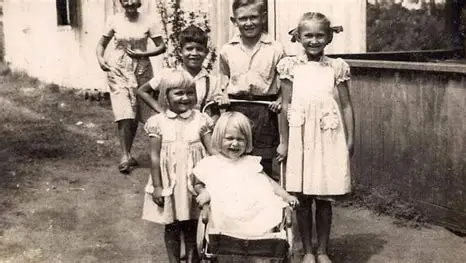
There’s something worth noting beyond the technical process. Families who restore old photographs often describe the experience as reconnecting with relatives they never met, or seeing a parent’s youthful face clearly for the first time.
A faded photo of a grandmother at 19, restored and sharpened, can carry weight that goes well beyond pixel quality. This emotional dimension explains why restoration apps have grown so quickly in popularity among casual users, not just hobbyist photographers.
The combination of accessible technology and genuine sentimental value is rare — and it’s part of what makes this particular corner of mobile apps so compelling to watch evolve over the coming years.
Keep reading
You might also like
How to Share Music App Status on WhatsApp Easily
Adding music to your WhatsApp status can turn a simple update into something people actually stop to watch. Here's how to do…

Amazon TV App: Complete Guide to Features and Setup
Streaming on Amazon Fire TV depends entirely on one piece of software: the Amazon TV app. Here's everything you need to know…